Control Tower Motor City Office 302 - Dubai

Apple Mac Solutions

Your MacBook is NOW in Safe Hands

Apple Mac Solutions, located in the heart of UAE, offers reliable solutions for hardware, software, as well as technical issues. With skilled technicians, original Apple Components, and warranties, we assure quality service.

Get your quote today!

Get your quote today!

  • Professional Services
  • Customer Satisfaction
  • Maintenance Check mark Same Day Service
  • Friendly Team

17+

Years of Experience

100%

Original Parts

Free

Pickup & Delivery

1 Hour

Fast Repair Time

24/7

Support Services

Models We Repair

screen

MacBook Air 13”, 15” Repair

intel, M1, M2, M3 chip

Fix Now
screen

MacBook Pro 14”, 16” Repair

intel, M3, M3 Pro, M3 Max chip

Fix Now

Other Models

MacBook Issues We Fix At Our Dubai Outlet (Services):

Screen Repair and Replacement

Our expert technicians provide prompt screen repair and replacement services for cracked or malfunctioning MacBook screens, ensuring clear and vibrant display quality.

Screen Repair and Replacement

Our expert technicians provide prompt screen repair and replacement services for cracked or malfunctioning MacBook screens, ensuring clear and vibrant display quality.

Screen Repair and Replacement

Our expert technicians provide prompt screen repair and replacement services for cracked or malfunctioning MacBook screens, ensuring clear and vibrant display quality.

Screen Repair and Replacement

Our expert technicians provide prompt screen repair and replacement services for cracked or malfunctioning MacBook screens, ensuring clear and vibrant display quality.

Screen Repair and Replacement

Our expert technicians provide prompt screen repair and replacement services for cracked or malfunctioning MacBook screens, ensuring clear and vibrant display quality.

Screen Repair and Replacement

Our expert technicians provide prompt screen repair and replacement services for cracked or malfunctioning MacBook screens, ensuring clear and vibrant display quality.

Screen Repair and Replacement

Our expert technicians provide prompt screen repair and replacement services for cracked or malfunctioning MacBook screens, ensuring clear and vibrant display quality.

Screen Repair and Replacement

Our expert technicians provide prompt screen repair and replacement services for cracked or malfunctioning MacBook screens, ensuring clear and vibrant display quality.

Screen Repair and Replacement

Our expert technicians provide prompt screen repair and replacement services for cracked or malfunctioning MacBook screens, ensuring clear and vibrant display quality.

Screen Repair and Replacement

Our expert technicians provide prompt screen repair and replacement services for cracked or malfunctioning MacBook screens, ensuring clear and vibrant display quality.

Screen Repair and Replacement

Our expert technicians provide prompt screen repair and replacement services for cracked or malfunctioning MacBook screens, ensuring clear and vibrant display quality.

Screen Repair and Replacement

Our expert technicians provide prompt screen repair and replacement services for cracked or malfunctioning MacBook screens, ensuring clear and vibrant display quality.

Screen Repair and Replacement

Our expert technicians provide prompt screen repair and replacement services for cracked or malfunctioning MacBook screens, ensuring clear and vibrant display quality.

Screen Repair and Replacement

Our expert technicians provide prompt screen repair and replacement services for cracked or malfunctioning MacBook screens, ensuring clear and vibrant display quality.

MacBook Upgraded Services in Dubai

Nope! We don’t push our invaluable customers to change their MacBook right away if it’s not operating actively. Instead, we support them by guiding them on how they can upgrade this old device to run faster, safer, and longer. The most common upgrades are:

Out of Warranty MacBook Repair in Dubai

No matter the issue—whether your MacBook won’t start up, is functioning slowly, lacks power, or shows lines on the display—the solution is just a visit away. Our skilled technicians are more than ready to promptly and effectively tackle your MacBook’s problems.

Here are some common out-of-warranty MacBook issues we can fix:

  • Failed MacBook battery
  • Failed MacBook logic board
  • Failed MacBook optical drive
  • Failed MacBook memory chip
  • Failed MacBook Magsafe DC board
  • Failed MacBook hard drive or SSD Drive
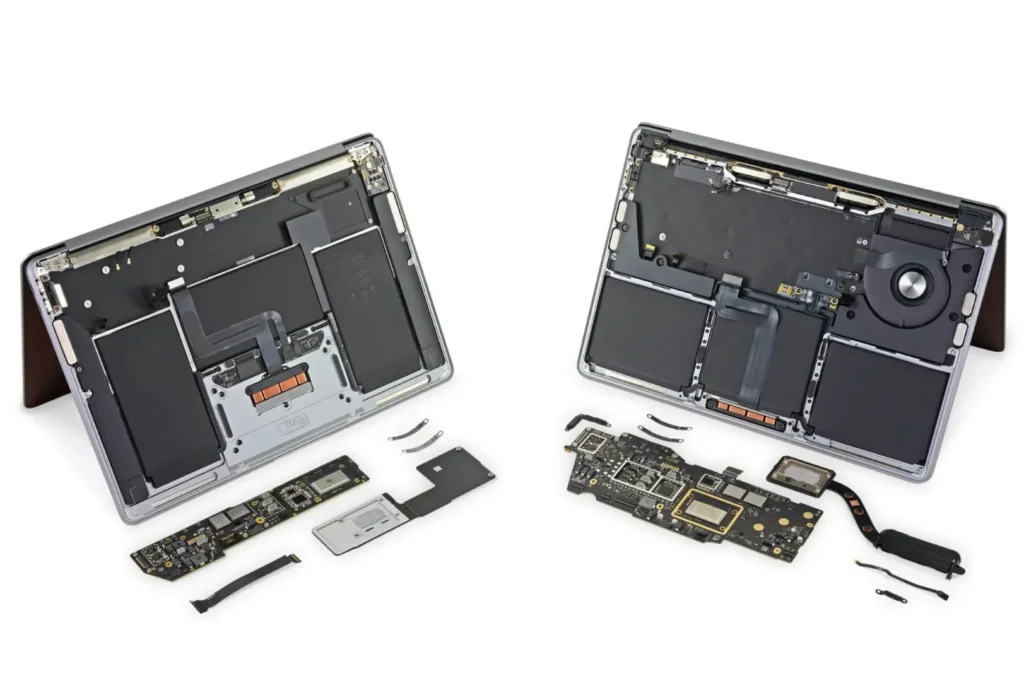
If the hard drive of your MacBook fails or has already failed, we can replace it with one of higher storage capacity to achieve faster data retrieval speeds. Additionally, we provide data recovery services for failed hard drives, or we can transfer your backup from an external drive to a new one, as long as it fits within your budget.

Why choose us for MacBook Service Dubai

  • Certified Technicians:

    Our staff technicians are certified to maintain quality work experience. We have a wide variety of training workshops where our staff undergo comprehensive training programs that cover a wide range of MacBook models.

  • Genuine Apple Components:

    We proudly claim to use original Apple components for your devices. That’s why our customer retention ratio is much higher than any other MacBook service providers in Dubai. We never compromise on quality.

  • Damage to Components:

    If not repaired correctly, there’s a risk of causing further damage to internal components, such as the logic board, keyboard, screen, or battery.

  • Damage to Components:

    If not repaired correctly, there’s a risk of causing further damage to internal components, such as the logic board, keyboard, screen, or battery.

  • Damage to Components:

    If not repaired correctly, there’s a risk of causing further damage to internal components, such as the logic board, keyboard, screen, or battery.

Where We Support/Locations Where You Can Reach Us!

  • Deira
  • Deira
  • Deira
  • Deira
  • Deira
  • Deira
  • Deira
  • Deira
  • Deira
  • Deira
  • Deira
  • Deira
  • Deira
  • Deira
  • Deira
  • Deira
  • Deira
  • Deira
  • Deira
  • Deira
  • Deira
  • Deira
  • Deira
  • Deira
  • Deira
  • Deira
  • Deira
  • Deira
  • Deira
  • Deira
  • Deira
  • Deira
  • Deira
  • Deira
  • Deira
  • Deira
  • Deira
  • Deira
  • Deira
  • Deira

Common Apple MacBook Issues and Solutions

MacBook Wi-Fi Connectivity Problems

The MacBook must be connected to a Wi-Fi network to access any browser. If you encounter a Wi-Fi problem, you can run a diagnostic check to fix your MacBook. For better results, you need to have the best Wi-Fi connection

Solution

To fix the above-discussed issue, restart your MacBook and Wi-Fi router. Ensure that your MacBook is within the range of your network, where router signals can be easily accessed.

Reset networking settings by going to System Preferences > Network > Wi-Fi > Advanced > TCP/IP > Renew DHCP lease.

If the issue persists, try creating a new network or contact the internet service provider in your area.

MacBook Wi-Fi Connectivity Problems

The MacBook must be connected to a Wi-Fi network to access any browser. If you encounter a Wi-Fi problem, you can run a diagnostic check to fix your MacBook. For better results, you need to have the best Wi-Fi connection

Solution

To fix the above-discussed issue, restart your MacBook and Wi-Fi router. Ensure that your MacBook is within the range of your network, where router signals can be easily accessed.

Reset networking settings by going to System Preferences > Network > Wi-Fi > Advanced > TCP/IP > Renew DHCP lease.

If the issue persists, try creating a new network or contact the internet service provider in your area.

MacBook Wi-Fi Connectivity Problems

The MacBook must be connected to a Wi-Fi network to access any browser. If you encounter a Wi-Fi problem, you can run a diagnostic check to fix your MacBook. For better results, you need to have the best Wi-Fi connection

Solution

To fix the above-discussed issue, restart your MacBook and Wi-Fi router. Ensure that your MacBook is within the range of your network, where router signals can be easily accessed.

Reset networking settings by going to System Preferences > Network > Wi-Fi > Advanced > TCP/IP > Renew DHCP lease.

If the issue persists, try creating a new network or contact the internet service provider in your area.

MacBook Wi-Fi Connectivity Problems

The MacBook must be connected to a Wi-Fi network to access any browser. If you encounter a Wi-Fi problem, you can run a diagnostic check to fix your MacBook. For better results, you need to have the best Wi-Fi connection

Solution

To fix the above-discussed issue, restart your MacBook and Wi-Fi router. Ensure that your MacBook is within the range of your network, where router signals can be easily accessed.

Reset networking settings by going to System Preferences > Network > Wi-Fi > Advanced > TCP/IP > Renew DHCP lease.

If the issue persists, try creating a new network or contact the internet service provider in your area.

What are the risks associated with MacBook laptop repairs?

The risks associated with MacBook laptop repairs can include:

  • Damage to Components:

    If not repaired correctly, there’s a risk of causing further damage to internal components, such as the logic board, keyboard, screen, or battery.

  • Damage to Components:

    If not repaired correctly, there’s a risk of causing further damage to internal components, such as the logic board, keyboard, screen, or battery.

  • Damage to Components:

    If not repaired correctly, there’s a risk of causing further damage to internal components, such as the logic board, keyboard, screen, or battery.

  • Damage to Components:

    If not repaired correctly, there’s a risk of causing further damage to internal components, such as the logic board, keyboard, screen, or battery.

  • Damage to Components:

    If not repaired correctly, there’s a risk of causing further damage to internal components, such as the logic board, keyboard, screen, or battery.

  • Damage to Components:

    If not repaired correctly, there’s a risk of causing further damage to internal components, such as the logic board, keyboard, screen, or battery.

  • Damage to Components:

    If not repaired correctly, there’s a risk of causing further damage to internal components, such as the logic board, keyboard, screen, or battery.